
KARMENBOT / SOAF
Carry lessons into
the next task
SOAF · Self-Optimizing Agentic Framework
When an agent runs into a familiar rate limit, timeout, or connection error, it can draw on a lesson from earlier work. SOAF records lessons using rules and brings matching guidance into a later task.
How a lesson reaches the next turn
On supported failure paths, rules review known facts such as the error signature. A turn can finish without a new entry when the review finds no reusable lesson.
Review the failure
Rules recognize known errors such as rate limits, timeouts, and connection failures.
Save to the agent
Store a short lesson and its cues. Similar cues can merge. Each agent keeps up to 60 entries.
Match task cues
Look for a match in that agent’s lessons using the current task text and other available cues.
Bring in guidance
Supply up to 5 matching lessons. With no match, the turn proceeds as usual.
Later failures can add to what this agent has learned.
Rule-based failure guidance
The next turn in the same task can receive advice based on its last failure. For a rate limit, that starts with telling the user and avoiding an immediate retry.
Keyword-based lesson matching
Lessons are stored per agent. Matching entries come into the current turn as guidance. The review and matching steps need no extra model call.
Example: the model service returns HTTP 429
Suppose an agent is summarizing trial feedback when the model service hits a rate limit. Here is what the SOAF rule recommends.
HTTP 429Report the limit and the unfinished step
Tell the user what remains unfinished. Avoid retrying the same request immediately.
Is a configured backup engine available and permitted?
Backup available
Suggest waiting or using the backup
Engine selection and use still follow the current configuration and permissions.
No backup available
Stop the step and explain why
Report the limit and what remains to be done. Suggest trying again later.
The rate-limit lesson can go into the current agent’s library. SOAF can bring it back as guidance when a later task matches its cues.
Review and clear lessons in Growth
Open Growth in an agent’s settings to see learned experience, matching cues, and use counts. You can also clear that agent’s learned experience.
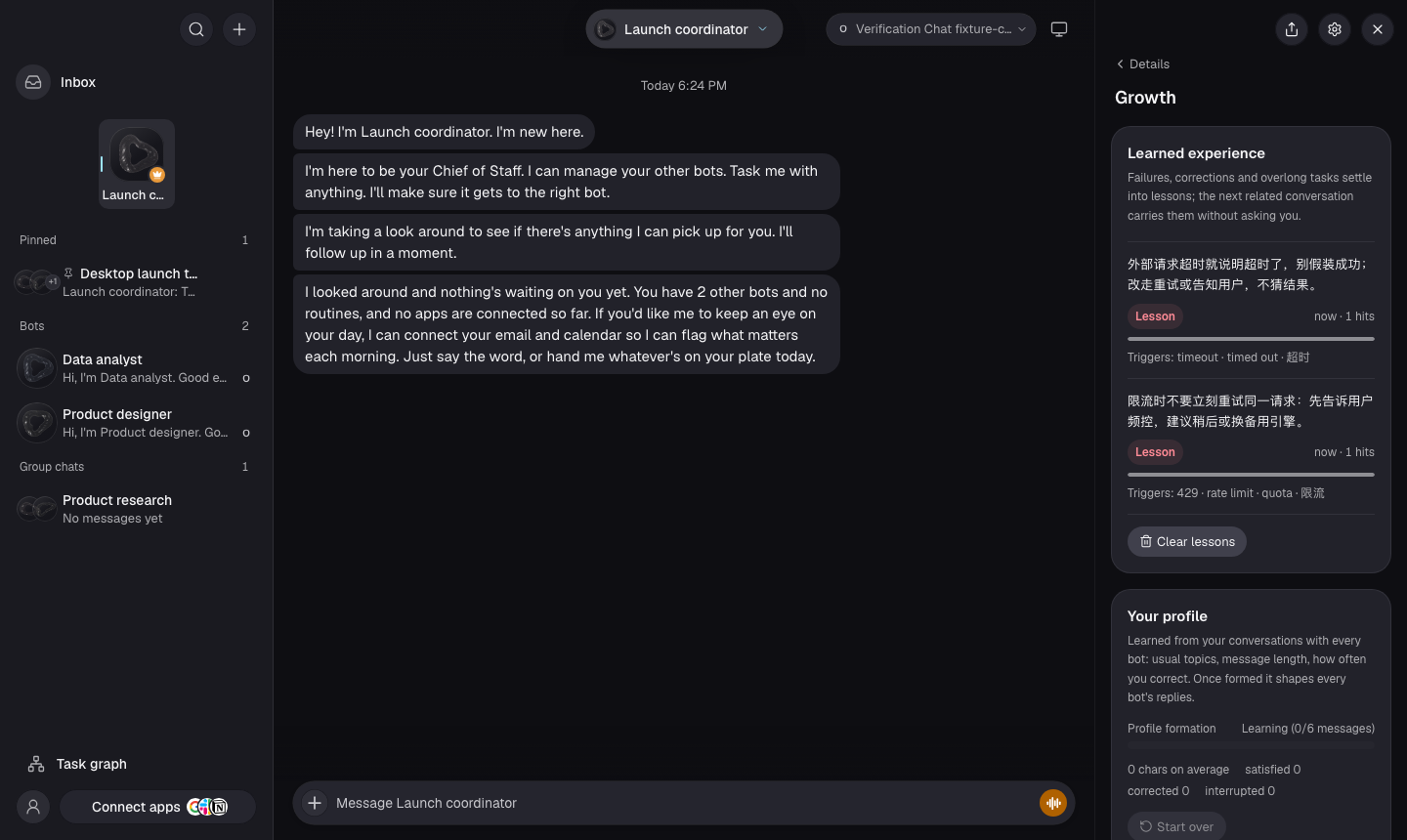
Lessons belong to the selected agent
Other agents in the workspace have their own libraries. Once you clear this library, its old entries can no longer be brought into later tasks through it.
Permissions follow the current configuration
Lessons can suggest what to do next. Access to models, tools, files, connected apps, and MCP services follows the task and workspace configuration.
Frequently asked questions
Does SOAF train the model?
SOAF uses rules to record short lessons and adds matches to the current turn’s context. It does not update model weights.
Does every turn create a lesson?
An entry depends on what a supported review path can recognize. Similar cues can merge, and unmatched lessons stay out of the current turn.
Do agents share a single lesson library?
SOAF stores and matches lessons per agent. Clearing learned experience in Growth applies to the selected agent.
Does guidance guarantee the task will finish?
Guidance gives the agent a way to proceed. Completion still depends on service availability, usable engines, task permissions, and what actually runs.